How to Pay Your Bills Online and Skip SurePay's 30-Cent Fee

SurePay charges BBD $0.30 for every bill paid in cash or by cheque at its counters. Here's how to pay bills free from the CIBC and Public Workers apps, using BL&P as the example, with a one-minute video for each.
On this page
In 2026 SurePay began charging 30 cents for every bill paid in cash or by cheque at its counters. Barbados Today reported it as a VAT-inclusive charge, which SurePay said was needed because of "additional imposed cash and cheque handling and related charges". It's charged per bill, so a household paying five bills a month at the counter spends BBD $18 a year on it.
You can skip the counter altogether. Banks and credit unions here let you pay bills from their apps and websites, so the bill gets paid from your phone or computer, with no trip to a SurePay location and no wait in line. That time goes to something else, like the supermarket run.
This guide uses two apps as examples, CIBC Caribbean and Public Workers, and a BL&P bill, since BL&P is Barbados' electricity company and its bill is one most homes get. The same steps work for any company your app lists as a biller, such as the Barbados Water Authority: only the company you pick and the account number from that bill change. I tested both apps with BBD $5.00 payments to a BL&P account, using screens from my own phone, and each has a one-minute video below. If there's a bill or an app you'd like a guide for, let me know.
Ways to pay without the counter fee
- Your bank or credit union's online banking. CIBC Caribbean's schedule of charges lists bill payment via online banking as "No Charge", and the Public Workers app calls its bill payment "our free Digital Banking service". BL&P's online payment page lists the institutions you can pay through, including Scotiabank, RBC, CIBC, Republic, First Citizens, Public Workers and the Sagicor Bank app.
- SurePay Online. Paying billers is free, but SurePay's terms list a one-off BBD $10.00 registration fee.
Before you start: find your Account ID
Both apps ask for your BL&P account number. The bill calls it Account ID, and prints it twice: under your name and address at the top left, and again on the payment stub.
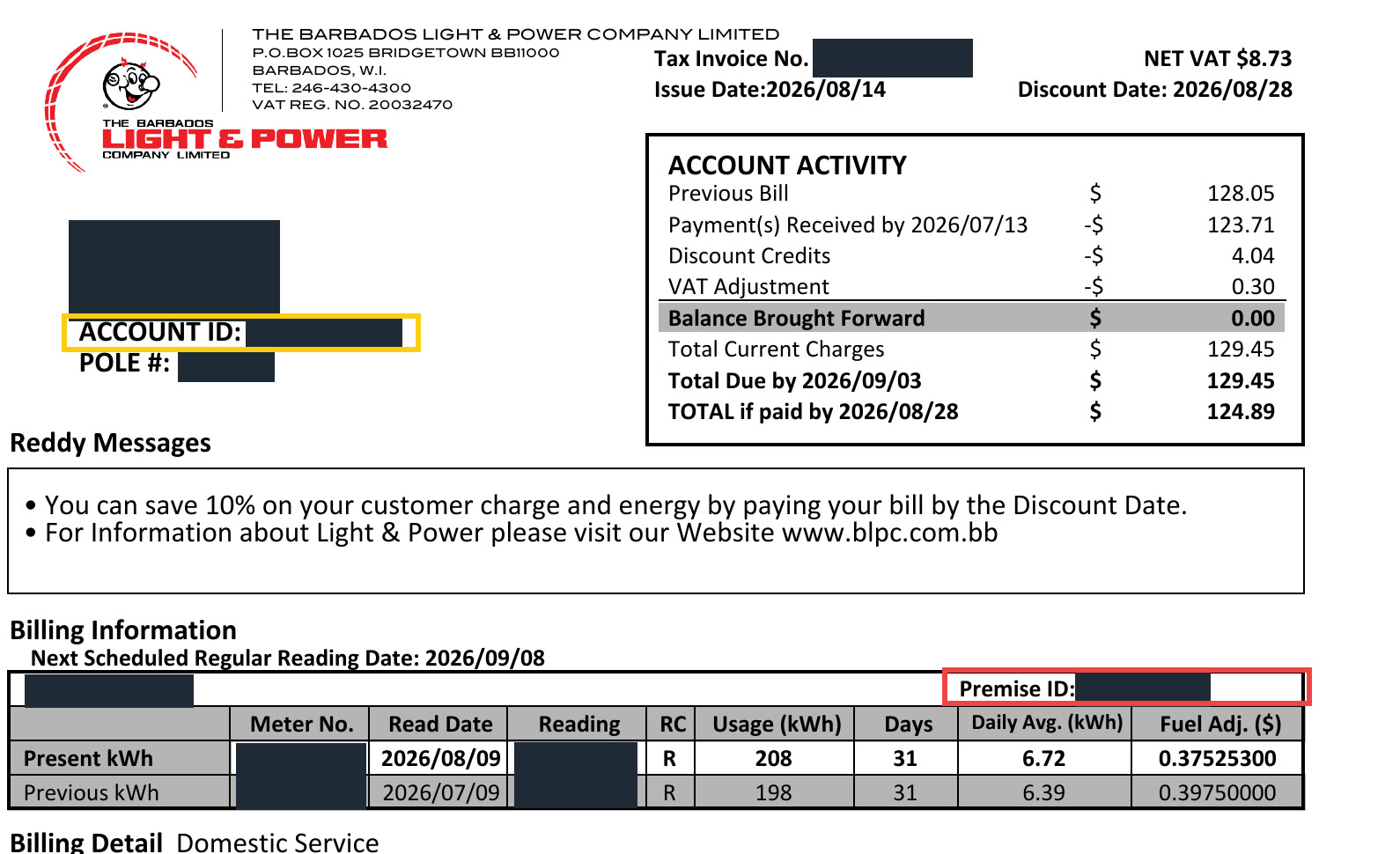
Use the Account ID, outlined in gold. The Premise ID, outlined in red, is a different number.
Two other long numbers on the bill are easy to mistake for it. The Premise ID, in the Billing Information table, can start with the same digits as the Account ID. The Tax Invoice No. sits at the top right. Neither one goes in the account number field.
You'll also need the account holder's name exactly as it appears on the bill.
Paying from the CIBC app
If the video doesn't load, watch it on YouTube.
- Sign in and tap Payments.
- The first time, tap Bills, then + Add New.
- Tap Billing Company, search for "Light" and choose Barbados Light & Power.
- Enter the Account ID in the Account Number field, then the last and first name as they appear on the bill. The nickname is optional. Tap Register.
- CIBC sends a one-time verification code to confirm it's you adding the biller. The app offered me text or email; I chose email, and the email warns not to share the code "with anyone including bank representatives". Enter the code in the app.
- When you see Bill Registered, tap Pay Bill. Choose the bill, the account you're paying from and the amount, then check the details and tap Confirm.
- The Bill Paid screen shows a transaction reference number. Keep it until the payment appears on your BL&P account.
Registering the bill is a one-time step. Next time, go straight to Payments, then Pay a Bill. CIBC also has its own how-to videos for adding a payee and paying bills.
Paying from the Public Workers app
If the video doesn't load, watch it on YouTube.
- Sign in, tap Transfer, then Make a Bill Payment, and close the welcome message. This opens BPW BillPay, which looks different from the rest of the app.
- Tap Manage Payees. Your existing payees are listed first. Scroll down past them to the Add a New Payee form.
- Start typing "Barbados Light & Power" in the payee name field and pick it from the list. Enter the Account ID as the Payee Account/Policy Number, the name exactly as it is on the bill, and choose the account to pay from. Tap Add This New Payee, check the details and tap Confirm.
- Tap Setup New Payment. Check that Barbados Light & Power is the selected payee, enter the amount, make sure the frequency says Immediate and tap Submit. Check the confirmation screen and tap Confirm.
A few things work differently from CIBC. Public Workers didn't send me a one-time code when I added BL&P. The success screen says "Payment sent has been successful." but shows no reference number, so check the account you paid from for the debit. And a payment set to Immediate "cannot be cancelled via this service"; the app says to contact BillPayOperations@bpwccul.bb for help.
If the app lets you sign in but transfers fail with no explanation, your account may have been set to view-only. Mine had, after a few months without activity, and the app never said so. Staff at a branch lifted it in a couple of minutes.
When the payment reaches BL&P
BL&P says a payment made through local online banking "will post to your BLPC account by the next working day." My two test payments, one from each app, both showed on the BL&P account the same day they were sent, including the CIBC one made on a Sunday. CIBC's payment screen is more cautious, noting that "some bill companies can take up to 3 business days to process a payment."
The timing matters because of the discount. The August bill I used for this guide says "You can save 10% on your customer charge and energy by paying your bill by the Discount Date," and the date is printed on it. I've paid on the Discount Date itself through Republic's online banking and still got the discount, but that's one payment through one bank. Paying a few days before the date is the safer habit.
Questions about this topic?
Financial terms can be confusing. If you have questions about the article or ideas for what I should cover next, send me a DM.
Chat on Instagram