BiMPay: What It Is, What It Costs, and What Your Bank Is Calling It
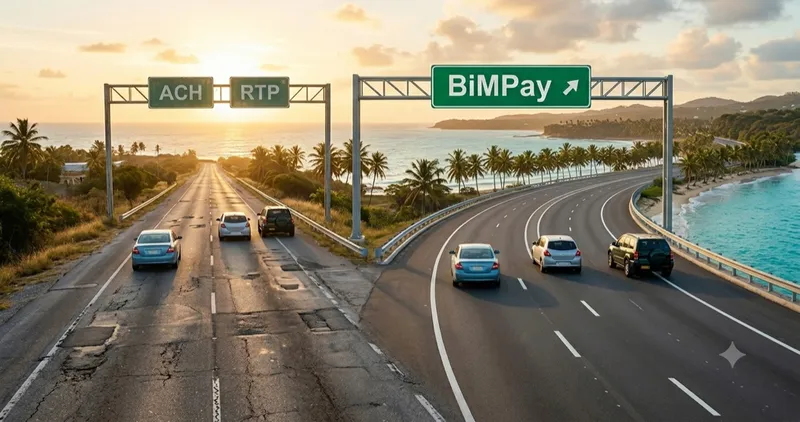
BiMPay went live on the night of June 12. Here is what Barbados' new instant payment system is, what it costs, whether you need a bank account, and what each bank is calling it.
On this page
BiMPay is live. At 11:59 PM on Friday 12 June, the Central Bank of Barbados switched the country onto BiMPay, its new instant payment system, and from the early hours of Saturday money in Barbados moves in about ten seconds. Prime Minister Mia Mottley made the first payment, buying food from a street vendor to show the QR system working. If you have seen the word in your banking app or your inbox and were not sure what it actually means for you, here is the plain version: what it is, what it costs, whether you need a bank account, and what your own bank is calling it.
What BiMPay is
BiMPay is the country's new national payment system, run by the Central Bank of Barbados and built with the payments firm Montran. The Central Bank puts it simply: BiMPay is a new, faster road for money to travel, and you do not have to change your car. Your bank or credit union app is the car; what changes is the road underneath it. The switchover happened on the night of Friday 12 June: the older roads the banks used for years, the Automated Clearing House and Real-Time Payments, closed through the day, the Central Bank flipped the switch at 11:59 PM, and transfers between institutions resumed on BiMPay from about 1 AM Saturday. The Central Bank has confirmed BiMPay is not replacing your bank's app or your online banking, so the way you pay today keeps working and you move onto BiMPay without having to do anything.
You will touch BiMPay in one of two ways:
- through your existing bank or credit union app, which now runs on BiMPay underneath, or
- through the Central Bank's own BiMPay wallet app, free to download from Google Play or the App Store.
Either way, the experience underneath is the same.
The name is doing more than one job, which is where a lot of the confusion starts. BiMPay is the national rail that carries instant transfers between banks and credit unions. BiMPay is also the name of the optional wallet app. And your own institution puts its own name on the same rail, so the same payment turns up as 1stPay+ at CIBC Caribbean, SMARTPay at AffinityPlus, and Co-Optima Pay at Public Workers'. If your institution is taking part, your transfers to other institutions already travel on that rail whether or not you ever open the app. Not everything moves this way: sending to someone at your own bank may still use your bank's own in-house option, and very large transfers go down a separate high-value lane.
One caveat carried over from launch: two institutions still cannot be linked inside the wallet app. Per the Central Bank's e-wallet support page, Scotiabank and AffinityPlus are yet to be connected, so check that page for the current list of institutions you can link. Scotiabank confirms it on its own BiMPay page, where it states the wallet "is not yet available to Scotiabank clients." Customers of both can still send and receive BiMPay transfers through their own apps and online banking.
What BiMPay lets you do
The headline is speed. Money reaches the person you send it to in about ten seconds, any time of day, every day of the year, weekends and public holidays included.
A few things make it genuinely different from what we have now:
- You can send money using someone's phone number or email address instead of hunting down their account number. The system calls this an alias.
- Before the money leaves your hands, BiMPay shows you the name on the account you are paying, so you can check it is the right person before you confirm.
- A small vendor can take a payment with a QR code, no card machine and no bank account required.
- You can send a Request to Pay, a payment request that lands on someone's phone, and the money moves the moment they approve it.
- If you send money by mistake, you can ask to recall it within 48 hours. The recipient's bank then reviews the request, and the person you paid has to agree before it comes back, so it is a safety net rather than an instant undo.
- It works across every participating bank and credit union, so it does not matter whether you and the other person bank at the same place.
At launch the participating institutions are six commercial banks (CIBC Caribbean, First Citizens Bank, RBC Royal Bank, Republic Bank, Sagicor Bank, and Scotiabank) and the island's three largest credit unions (AffinityPlus, Barbados Public Workers' Co-operative, and City of Bridgetown).
What BiMPay costs
For ordinary people, nothing. BiMPay is free for individual users, and the Central Bank has committed to keeping it that way.
Small businesses with daily revenue below BBD $10,000 are also exempt. For everyone else, no BiMPay fee applies yet either: the Central Bank has frozen all BiMPay-related fees, for individuals and businesses alike, until 15 September 2026. Before any institution can charge a business fee after that date, it has to submit its proposed fees to the Central Bank for a no-objection and give customers two weeks' notice, so you will hear about any charge before you see it. The Central Bank has also said those business fees will be tiered by size, so a micro or small business will not be charged the way a large one is.
You do not need a bank account
This is the part worth repeating, because it changes who gets to take part. If you do not have a bank account, you can still use BiMPay through the wallet app. You download it, confirm your mobile number and email, and provide your name, address, date of birth, and national registration number (non-nationals living in Barbados use a residence permit). Because the wallet holds real money, you then choose a licensed institution to safely hold your funds, what BiMPay calls a custodian. This does not mean opening a bank account or signing up for any other product; the custodian only safeguards your money. Sagicor Bank is the first to offer this to people without a bank account. Verification usually takes about thirty minutes, though a case that needs extra review can take up to five business days. A basic wallet can receive up to BBD $750 a day, BBD $2,500 a month, and BBD $30,000 a year, with higher limits available after a further check; spending from it is limited only by your balance.
What your bank is calling it
Here is where it gets confusing, and where it pays to read your own bank's emails closely. BiMPay is the system underneath, and most banks and credit unions are adding it to products you already use, under names you may already know. If you bank with CIBC Caribbean you will see "1stPay+." AffinityPlus members will see "SMARTPay." Public Workers' members will see "Co-Optima Pay." Sagicor Bank keeps "Sagicor Pay" for sending money to other Sagicor customers and adds the BiMPay options alongside it. Underneath, it is all the same road.
Drawing from the launch emails these institutions have been sending customers through May and June, a few specifics are worth knowing:
- CIBC Caribbean told customers the actual numbers: instant BiMPay transfers up to BBD $20,000 per transaction and BBD $40,000 a day. Anything larger moves to a high-value lane it calls Urgent (RTGS), the only road for amounts past the BBD $500,000 cap a single BiMPay transaction carries. The older Standard (ACH) and Instant options are being discontinued, while 1stPay continues unchanged for sending to other CIBC clients. From 13 June, 1stPay+ also adds QR payments and the ability to recall a payment within 48 hours.
- Scotiabank has since published its own BiMPay page, and its limits sit well below CIBC's: BBD $5,000 per transaction and BBD $6,000 a day. Read that daily figure carefully, because it "includes transfers made across all Scotiabank funds transfer methods," so BiMPay shares the ceiling with everything else you send. Retail customers who need to move more than that are told to visit a branch. If that ceiling is lower than the limit you already hold on Scotia Online for the same account, the Central Bank has directed that the two should match, so take it up with the bank. RTP and ACH are both discontinued.
- AffinityPlus members now log in with a unique username instead of their account number, and need a mobile number on file for password resets. If you have not set yours, do it the next time you log in.
- Sagicor Bank is offering the fullest menu so far: instant transfers by account number, by alias, and by QR code, plus a request-for-funds option, with very large transfers, above BBD $500,000, kept on a separate lane it calls Rush. Its older "No Rush" and "Instant" transfer options end with the switchover, replaced by the BiMPay ones.
- Barbados Public Workers' members will see Co-Optima Pay inside the Co-Optima Banking App, with transfers coming from a dedicated Co-Optima Pay share record (Share 16, S:16).
- Republic Bank keeps everything inside RepublicOnline and RepublicMobile with no new name on it. One thing its customers should know: using the optional BiMPay wallet means completing an account-linking step by contacting or visiting the bank.
- C.O.B Credit Union is routing BiMPay through its existing app, and First Citizens through its online banking, so the main thing they ask is that your contact details are current so you catch their updates.
| Your institution | What you will see it called | What you can do at launch | Worth knowing |
|---|---|---|---|
 CIBC Caribbean CIBC Caribbean | 1stPay+ (alias), and Instant Payment powered by BiMPay | Send by alias (mobile or email), account number, or QR code, across banks and credit unions; recall a payment within 48 hours | Instant limits: BBD $20,000 per transaction, BBD $40,000 daily. Standard (ACH) and Instant options end; high-value transfers use the Urgent (RTGS) lane. 1stPay stays for CIBC-to-CIBC |
 Sagicor Bank Sagicor Bank | Powered by BiMPay (Sagicor Pay stays for Sagicor-to-Sagicor) | Instant by account number, alias, or QR code, plus request funds | Very large transfers stay on a separate RTGS lane it calls Rush, for amounts above BBD $500,000. Older "No Rush" and "Instant" options end |
 Scotiabank Scotiabank | BiMPay, in the Scotia Caribbean App and Scotia Online | Send and receive instantly across banks and credit unions | Limits are the lowest published so far: BBD $5,000 per transaction and BBD $6,000 daily, and that daily cap covers all Scotiabank transfer methods together. Larger transfers mean a branch visit, though the Central Bank has directed that a BiMPay limit match the limit you already hold on the same account. RTP and ACH end. Its BiMPay page says the wallet is not yet available to Scotiabank clients |
 AffinityPlus Credit Union AffinityPlus Credit Union | SMARTPay, powered by BiMPay | Send and receive instantly; existing bill payments stay | Logs in with a unique username instead of your account number; add a mobile number for resets. Not yet linkable inside the BiMPay wallet app per the Central Bank's support page |
 Barbados Public Workers' (BPWCCUL) Barbados Public Workers' (BPWCCUL) | Co-Optima Pay, powered by BiMPay | Instant transfers by alias (mobile or email) across banks and credit unions, in the Co-Optima Banking App | Transfers come from a dedicated Co-Optima Pay share record (Share 16, S:16) |
 C.O.B Credit Union C.O.B Credit Union | BiMPay, in the C.O.B Mobile App | Instant transfers by account number or alias, QR codes, request funds | Download the app and check your contact details are current |
 Republic Bank Republic Bank | BiMPay, in RepublicOnline and RepublicMobile | Keep transferring through the existing apps; the BiMPay wallet is optional | Apps were offline Friday 7 PM to midnight for the changeover; linking an account to the BiMPay wallet means contacting or visiting the bank |
 First Citizens First Citizens | BiMPay, through online banking | Details on the First Citizens BiMPay page | Check their online banking and BiMPay page for setup steps |
 RBC Royal Bank RBC Royal Bank | BiMPay, in RBC Digital Banking | Send and receive instantly across banks and credit unions, by account number or alias, plus QR request-to-pay | Now has its own BiMPay page. To use the optional wallet, generate the link token from the "BiMPay Token" menu in RBC Digital Banking; it expires after 15 minutes |
RBC Royal Bank was the quiet one at launch. It is participating, per the Central Bank's official list, but at launch it had sent no customer emails we could find and its Barbados pages said nothing about BiMPay. That has since changed: RBC now runs a full BiMPay page covering alias payments, QR request-to-pay, and the wallet, and it says there are no retail transaction fees at launch. One early signal of how RBC fits the new system, from Sagicor's instructions to its own clients: sending to an RBC account takes just the seven-digit account number and the branch where the account was first opened, with no transit code needed.
What is not in the launch yet
It helps to know the limits up front. The first phase, the one now in operation, covers sending money between people and paying small or micro businesses through the individual wallet.
Paying utilities, groceries, gas, and government bills, along with a dedicated wallet built for merchants, comes in a second phase the Central Bank has not yet dated. Cross-border payments are further out still. So think of BiMPay for now as the way to move money between people and pay small vendors. Paying your monthly bills through it is on the way in a later phase. Until then, you keep paying those bills the way you do now, through your bank or credit union's app or online banking, which does not change.
One more thing BiMPay will not do: you cannot send a payment straight to a loan account or a credit-card account, because those run on separate rails. Keep paying those the way you do now.
Getting started
There is no big setup required, but a few small things will make the switch smoother:
- The one-time token is for linking an account to the Central Bank's BiMPay wallet app. If you are only sending and receiving through your own bank's app or online banking, the wallet setup does not apply to you and there is no token step. If you are setting up the wallet, institutions hand the token over one of two ways: some generate it inside their own app, and others route you through the BiMPay app with your bank sitting behind it as the account that holds your money. Generate it before you begin so the wallet step goes in one pass, and note that some tokens expire quickly.
- Make sure your contact details with your bank or credit union are current, so you receive their updates.
- If you bank with AffinityPlus, set your unique username and add a mobile number, which now replace logging in with your account number.
- If you use a credit union app such as the C.O.B Mobile App, download or update it so you have the latest version.
- If a payment of yours does not arrive, it is far more likely an account-detail or setup issue at one of the institutions than a fault in the rail. The rejected-payment question below explains what to do.
For step-by-step setup help and the latest details, the Central Bank's BiMPay e-wallet support page is the fullest and most up-to-date source.
Quick answers
When did BiMPay launch? BiMPay went live on the night of 12 June 2026, with the Central Bank flipping the switch at 11:59 PM. Transfers between institutions resumed on BiMPay from about 1 AM on Saturday 13 June.
Does BiMPay cost anything to use? It is free for individuals and for small businesses with daily revenue below BBD $10,000, and no institution may charge any customer a BiMPay fee until 15 September 2026.
Do I need a bank account? No. Unbanked users can register through the BiMPay wallet app in about thirty minutes, though a case that needs extra review can take up to five business days.
Do I need the BiMPay app to receive money? No. If you have a bank or credit union account, money can be sent straight to that account using your account number. You do not need the BiMPay wallet app, a sign-up, or a token to receive money that way. Tokens are only for people who choose to link an account to the optional BiMPay wallet app. The sender may see the option under another name at their bank, such as 1stPay+ or SMARTPay.
Do I need the BiMPay app to send money? No. You can send from your own bank's app or online banking using the recipient's account number. Your bank may list the instant option under its own name, such as 1stPay+ at CIBC Caribbean or SMARTPay at AffinityPlus, and some banks have retired their older Standard and Instant choices. The BiMPay wallet app is a separate option you do not have to use.
Can someone pay me using my phone number or email instead of my account number? Yes. BiMPay lets a sender use an alias, your mobile number or email, and matches it to your account behind the scenes. Two things are worth knowing. An alias points to only one account, so your phone number can be registered at just one bank at a time, and moving it to another bank means releasing it at the one that holds it first. And if you use the wallet app, your mobile number and email become aliases automatically.
Is there a limit on the BiMPay wallet? A basic wallet can receive up to BBD $750 a day, BBD $2,500 a month, and BBD $30,000 a year, and spending from it is limited only by your balance. Higher limits are available after an additional check.
Can I pay my water or electricity bill with BiMPay on day one? Not yet. Bill payments arrive in a later phase.
Is 1stPay+ or SMARTPay the same as BiMPay? Yes. Several banks are putting their own name on the same system. Underneath, it is all BiMPay.
What happens to my current transfers? Your bank's app and online banking do not change. The Central Bank says BiMPay is not replacing your bank's app or your existing online banking, even though BiMPay does take over from the ACH and RTP systems as the road underneath. In plain terms, the way you pay keeps working and the switch happens in the background.
Why would a payment be rejected, or a salary arrive late? Rejections are rare. In BiMPay's first month the Central Bank put the failure rate at 0.2 percent, roughly one or two in every 500 transactions. Because BiMPay checks account details in real time, a payment with a wrongly formatted or out-of-date account or branch number is rejected at once rather than patched in the background the way the old batch system did. A common cause is a branch that has since closed or a bank that has changed hands, so routing details someone has used for years no longer match. For salaries, getting the payroll file into the correct format is the employer's and their bank's job. If you are paid by direct deposit you need do nothing, and a correctly formatted payment is credited to your account without delay. If your salary or pension is delayed, the Central Bank has directed institutions to credit you provisionally while they trace the problem, and not to charge you for the correction or penalise you for the delay. If your own institution cannot resolve it, you can contact the Central Bank's BiMPay help desk on 424-2729 or by WhatsApp on 851-2834.
I have used 1stPay for years. Why is it giving trouble now? 1stPay still works. The usual problem is a QR code mismatch. 1stPay and its BiMPay version, 1stPay+, use separate QR codes: plain 1stPay pays other CIBC customers, while 1stPay+ carries payments across banks and credit unions on BiMPay. In the CIBC app, generate the code that matches the payment you are making.
BiMPay allows large transfers, so why is my bank's limit so much lower? Two different limits are at work. A single BiMPay transaction can carry up to BBD $500,000, but your bank or credit union sets its own daily and per-transaction limits based on your relationship and risk profile, and that lower figure is the one that applies to you. CIBC, for example, caps instant BiMPay transfers at BBD $20,000 per transaction and BBD $40,000 a day. One thing your institution cannot do is set a lower limit on BiMPay than you already have on its own app for the same account. The Central Bank found some doing exactly that and has directed that your BiMPay limit match your existing product limit, so if it caps you below your usual limit, take it up with your institution.
If you have a question about setting up BiMPay, send it in and I will fold the answer into this guide. For how the first weekend actually went, the launch numbers, the Gmail fix, and what is still pending, see our companion piece: BiMPay, the first weekend. For a deeper comparison with Brazil's Pix, the closest match in the world to BiMPay's rail, see BiMPay vs Pix.
Questions about this topic?
Financial terms can be confusing. If you have questions about the article or ideas for what I should cover next, send me a DM.
Chat on Instagram